Resource categories allow specific resource capabilities to be attached to individual resource records; codes and descriptions are used to categorise resources.
Some organisations may choose to categorise their drivers based on the licence class or type of licence they hold. Perhaps they can only drive a standard vehicle size, or have a licence that can only drive a certain vehicle size with a set number of seats. Whereas other organisations may choose to categorise their drivers by the language they speak, similar to the guide categories. How organisations choose to categorise their drivers, guides and vehicles will be determined on the buisness requirements of the operating organisation.
- Driver categories and the vehicles they can drive (or perhaps the language they speak).
- Guides that speak specific languages.
- Vehicle categories could include the size vehicle or type of vehicle.
| Driver Categories | Guide Categories | Vehicle Categories | |||
|---|---|---|---|---|---|
| CO | Coach | FR | French Speaking | C1 | Coach - 15 Seater |
| DG | Driver/Guide | GE | German Speaking | C2 | Coach - 24 Seater |
| LI | Limousine | GR | Greek Speaking | C3 | Coach - 29 Seater |
| MB | Mini Bus | IT | Italian Speaking | C4 | Coach - 35 Seater |
| MV | Mini Van | SP | Spanish Speaking | C5 | Coach - 48 Seater |
| ON | Overnight | TG | Travelling Guide | LM | Limousine |
| ST | Standard Car | MB | Mini Bus - 12 Seater | ||
| MV | Mini Van | ||||
| SC | Standard Car | ||||
NOTE: The table above includes examples of codes and descriptions for different categories. The column to the left of each category shows the two character resource category codes, and the column to the right of each category are resource category description examples. Each category can be coded and named using categories and terminology specific to your organisational needs.
Create Resource Categories
-
From the Home menu, select
 Home > System > Code Setup.
- Click the Home menu to expand it:

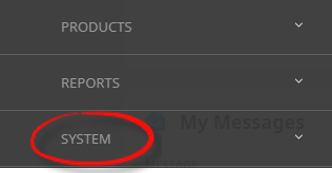
- Click the System menu option to expand it:

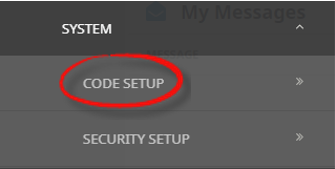
- Click Code Setup to go to the Code Setup menu:

- Click the Home menu to expand it:
-
From the Code Setup menu, selectResourcing > Resource Category.
- Click the Code Setup menu to expand it:

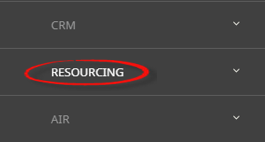
- Click Resourcing to expand the Resourcing menu:

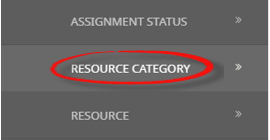
- Click Resource Category to open the Resource Category screen:

- Click the Code Setup menu to expand it:
-
On theResource Category screen, if the Resource Category required is not already in the list, click Insert.

-
On the blankResource Category screen, select a Resource Type, enter a Code and Description.
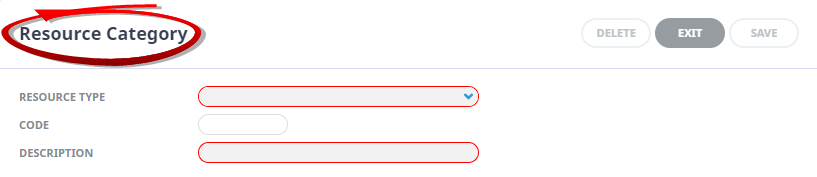
- Review the completed screen.
-
ClickSave to keep the changes.

-
ClickExit to discard any changes.



NOTE: Category records cannot be deleted if they have been attached to a resource, or used in an assignment.
About Resource Category Fields
Resource Type (Drop-down)
This field will default to Driver with selection of Guide, or Vehicle also available. The selection should be made as per the resource category requirement.
Code
This field is used to identify the Resource Category. The code can be up to 3 characters.
Description
Is a descriptive field to describe the Resource Category code. Example descriptions are available at the top of this page. This field will allow up to 30 characters.