This screen enables the period and YTD totals of the transaction balances posted to a GL account to be viewed for any period of any financial year.
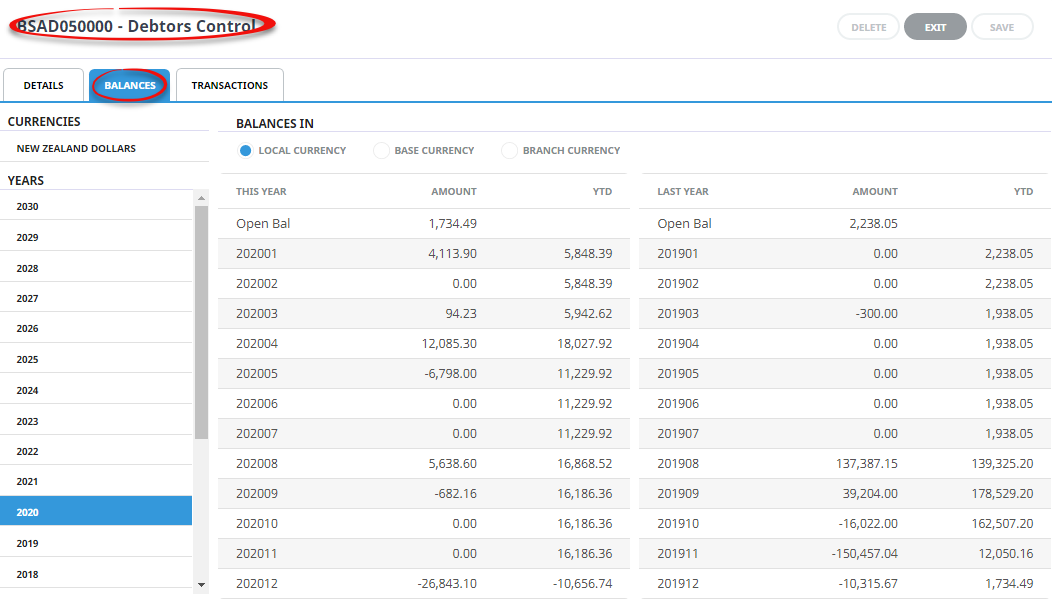
Account Currencies Section
This panel displays the currencies that are attached to the select account. On entry to this screen, 'Base Currency' is highlighted.
When there are multiple currencies, the balance that displays when base currency is highlighted is the sum of all transactions for the period (regardless of currency) converted to base currency at the exchange rate that prevailed (or was entered) at the time of the transaction.
Balances In
When a currency other than Base Currency is selected, these two radio buttons become active and allow the balances to be viewed in either Transaction (Local) Currency or Base Currency.
Local Currency
This radio button displays the balances in the currency currently highlighted.
NOTE: Only applicable when more than the Base Currency is attached to the account.
Base Currency
Displays the balances of the currently selected currency in Base Currency
Branch Currency
Displays the value of transactions made in the highlighted currency, in Branch Currency.
NOTE: Branch Currency is only used by those companies who have separate branch accounting and have performed the required setup. Branch Currency is not turned on by default.
Financial Years Section
Clicking on any one of these financial years will display the period-by-period and year-to-date (YTD) balances for the selected year and the previous (Last) year.