About the User Manuals
The user manuals for Tourplan NX are a set of manuals, available both online and in print, that assist users to use the system.
They are designed to supplement training; not replace it. The guides can be used as reference material for queries and assistance after training has been completed.
NOTE:
User Manual Conventions: used in the user manuals to highlight different types of information
|
Convention |
Icon / Style |
Definition |
|---|---|---|
| Any field, button or screen area | Italics in this font | Depending on context, relates to any of the following: on-screen label, field to select, button to click or text to enter. |
| Menu selection, screen or form name | Bold in this font | Indicates expandable text, where clicking the bold text expands into more detailed text or an image. The effect is available only for online pages - printed pages show the expanded text/images under the bold text (except for obvious menu selections, which are not expanded). |
| Note (simple) |

|
Highlights a relevant comment or point about the section or procedure. |
| Note (more important) |
|
Specific information to be aware of about the preceding paragraph(s). Might include further important detail in italics. |
| Drop-down text |

|
(Online only) Right-arrow: expand more detail about the text immediately to the right. Down-arrow: collapse detail. |
| Previous / Next pages |

|
(Online only) Links that go to either the immediately previous or next pages in the navigation Table of Contents. These are different from the browser Back / Forward buttons, which go to the last page visited in either direction. |
| Expand / Collapse procedures |

|
Expand procedure providing more detail and example images. Collapse detail. |
| Procedure | Enter rate details | Heading label for procedures, which are specific tasks or sets of steps to be carried out. |
| Breadcrumb Trail | Menu > Sub-menu > Selection | Indicates a menu selection path to follow, to arrive at a particular screen. For example, Home > Bookings and Quotes > FITs. |
Navigating the Online Pages
Use the menu in the right-hand frame to expand chapters and go directly to a page. Alternatively, use the previous and next arrows in the upper left area of the screen (just below the breadcrumb) to go to the previous or next page in the Table of Contents sequence.

NOTE: These are different from the browser Back / Forward buttons, which are typically found in the top left corner of the screen (next to the URL field) and go to the last page visited in either direction.
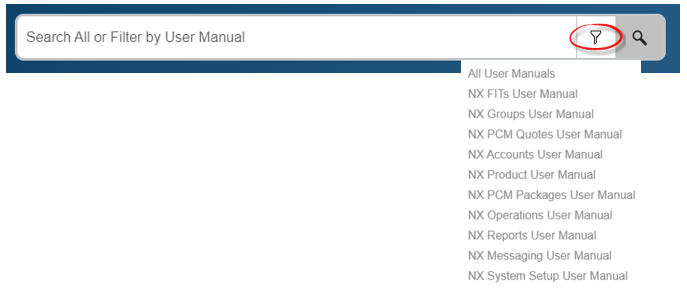
Header Search Bar
The search bar located on the right hand side of the header can be used to search all User Manual content or by specific Application.
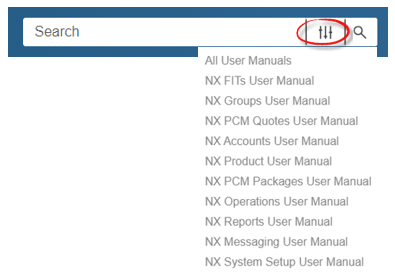
Home Page Search Bar
The search bar located in the middle of the home page can be used to search all User Manual content, or you can locate searched results for a specific User Manual for a particular Tourplan application you may be using.