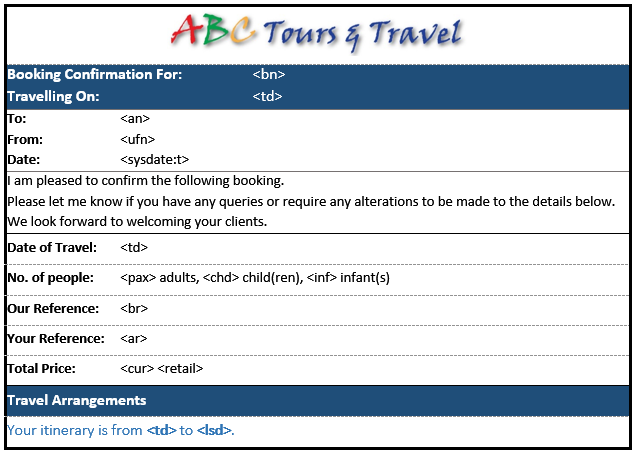
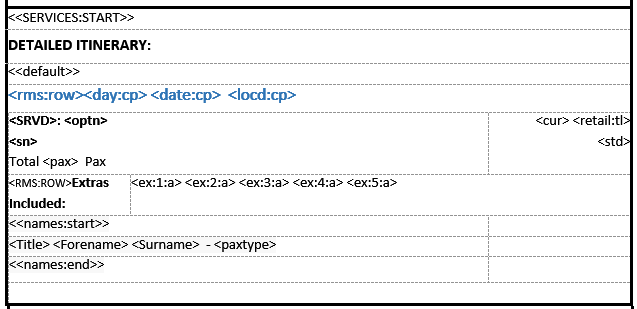
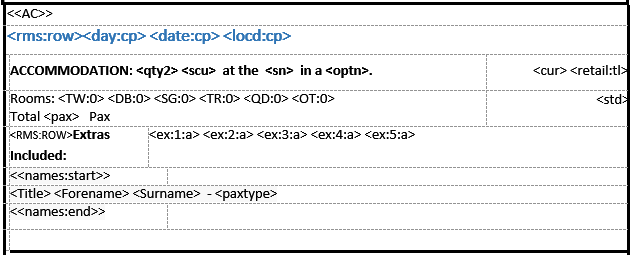
Service Currency Code Service Retail Amount. Append :tl and the total for the service and all included components is displayed. Indicates begining of Body/Lines Section of message. Supressed on output Fixed Text Indicates begining of Default lines format.  Supressed on output. Service day of the week :cp - Output is not repeated for subsquent services on the same day/date.  <rms:row> will remove the entire row if there is no substitutable data in the entire row. Date of Service :cp - The output is not repeated for subsequent services on the same date. Service Location Description :cp - The output is not repeated for subsequent services on the same day/date/location. Product Service Type Description Product Description/Name Product Supplier Name Number of adult pax having this service Additional items available with the product included. <rms:row> - If no data is substituted, completly remove the table row. Passenger Name Title - Mr, Mrs, Mast, Ms etc Passenger Christian/Forename Passenger Surname/Family Name Passenger Type - Adult, Child or Infant Service Currency Code Service Retail Amount :tl = Total for all components of the service Service Line Status Description Service Currency Code Service Retail Amount. Append :tl and the total for the service and all included components is displayed. The row containing the <<AC>> format code is removed on message output. Service day of the week :cp - The day name is not repeated for subsequent services on the same day/date. <rms:row> will remove the entire row if there is no substitutable data in the entire row. Date of Service :cp - the date is not repeated for subsequent services on the same date. Service Location Description :cp - The output is not repeated for subsequent services on the same day/date/location. Service Second Charge Unity Quantity (2) and Description (Night) Service Supplier Name - in conjunction with fixed text. Product Description. Quantity & type(s) of room. TW=Twin, DB=Double, SG=Single, TR=Triple, QD=Quad, OT=Other :0 = If room type is not used, suporess output Number of adult passengers having this service. Additional Items available with the product and included. <rms:row> - If no data is substituted, cpmpletly remove the data row. Passenger name title - Mr, Mrs, Master, Ms, etc <<Names:start>><<Names:end>> Indicators to show where pax names are to be output Passenger Christian/Forename Passenger Surname/Family Name Passenger Type - Adult, Child or Infant. User's full name Indicates the end of the Services Section. Conditional codes removed from output Booking Currency Code Booking Total Retail Amount Fixed Text User full name. The row with <<Services:end>> (above 'End of Tour Arangments') has been removed. Fixed Text Booking Agent Name Booking Consultant Name Booking Name Booking Travel Date Booking Travel Date (Repeated) Booking Header Total Adult Pax Full Booking Reference (Branch, Department, Reference Number) Booking Agent Reference Booking Total Retail Amount Booking Header Total Children Booking Header Total Infants (From) Booking Travel Date Booking Currency (Code) (To) Last Service Date System Date :T (Include Current Time)

Template Configuration

The substitution codes that output specific fields of data are enclosed in single chevron brackets< > e.g., <bn> will substitute the Booking Name.

A higher level of codes - enclosed in double chevron brackets << >> are used to define distinct sections within the template e.g., optional services or to indicate specific sections of the message e.g., pax names.

In addition to section codes and substitution codes, there are conditional codes that assist with the formatting and output of the message e.g., removing blank rows or containing email send commands.

The message template Body (Lines) Section can have different Line formats to suit different types of messages and different types of services. In addition to information, such as supplier name and address, services like transfers need to show a pick-up and drop-off date, time, and place. Sightseeing services need a service date (and possibly time); accommodation services need an in and out date, room types, and meals included. Products have a Message Format Type code attached to them that tells the system which format type to use for each product when the message is generated. In the event that a product does not have a Service Format Code attached, a "Default" format type must be included in each message template to allow some detail to be output for those products.

The example message in Message Configuration was created using this template.
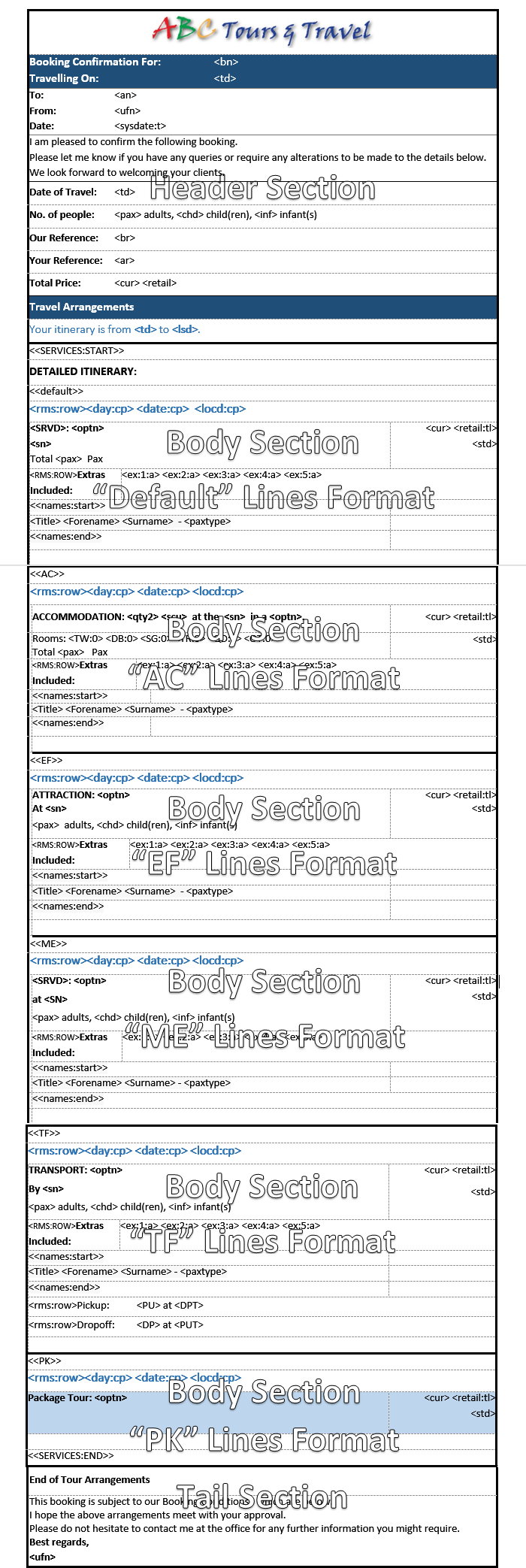
Although the example itinerary template includes the Default, AC (Accommodation), EF (Entry Fees), ME (Meals), TF (Transfers), and PK (Package Tours), only the Default, AC service formats were used in the booking. Selected template sections are detailed below.

Hover the mouse over the <SUBSTITUTION> codes in the template sections below to see a description. Click the code to see the substituted text. Not all substitution codes and template service formats are included.
Substitution codes enclosed within the double chevron brackets e.g. <<SERVICES:START>>, <<SERVICES:END>>, <<DEFAULT>>, <<AC>>, <<EF>> are automatically removed during message generation. They indicate where specific formatting or data should be output in the template. See Messaging Template Sections.

The code <rms:row> does not have any output and it is used to remove an entire row from a table if no data is returned by the subsequent substitution code.

Message Header Section
Message Body Section - <<Default>> Service Format
Message Body Section - <<AC>> Accommodation Service Format
Message Tail Section
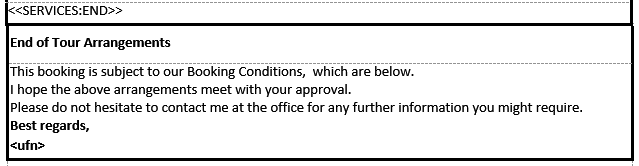
The Tail section starts immediately after the <<SERVICES:END>> tag.